
WordPress & WooCommerce plugin · Free on WordPress.org
Estimated Delivery Date for WooCommerce
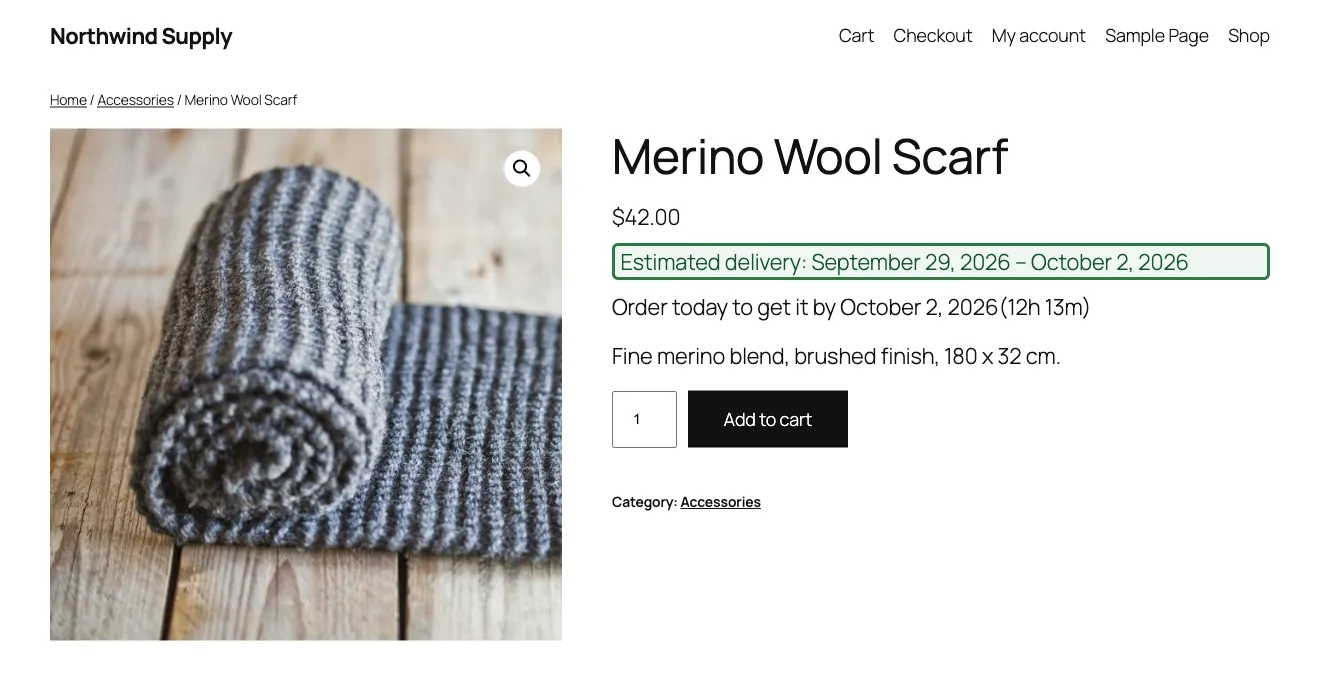
DevMerx Delivery Date Estimator calculates an accurate delivery-date estimate from your own processing and transit times, in business-day or calendar-day mode, with unlimited holidays and a daily order cutoff time built in. Override anything per product, then show the same estimate — one calculation engine, no drift — on the product page, shop and category archives, cart, checkout, the thank-you page, My Account, and WooCommerce order emails.
Install free from WordPress.org
Free · GPL-2.0 · No pricing for the free plugin, ever
Thu24You order
Fri25
Sat26
Sun27Closed
Mon28
Tue29
Wed30
Thu1
Fri2
Sat3
Coming As A Pro Add-on
Need extra delivery days for specific products?
Everything Pro adds, in one list
Everything further down this page is free and unrestricted. Pro is the layer on top, for stores whose delivery time is not one number for every order.
- Conditional delivery rules — match on category, tag, a specific product or variation, attribute, shipping zone, class or method, stock status, customer role, cart total or quantity, country, date range or day of the week.
- Add days, or set an exact window — so “Express arrives in exactly 1–2 days” is a rule, not a workaround.
- A message per rule, or hide the estimate entirely for the products a rule matches.
- Rule management — name, reorder, duplicate, enable or disable individually, and import or export between stores.
- A cutoff per zone, class and method, plus blackout dates you never dispatch on and a timezone independent of your site setting.
- Restock and backorder dates — per product or per variation, with lead time that scales by quantity.
- An estimate beside every shipping method, in both classic checkout and the Checkout block.
- Per-item and split-shipment estimates, instead of one date for the whole order.
- Dispatch dates on your orders screen — sort, filter, and override any single order.
- Simulate before you publish, and see “why this date?” for any estimate.
- Delivery insights — promised versus actually delivered, accuracy by product, category and zone, and orders heading for a missed date.
- Still calculated locally — no external API calls, no customer data leaving your site, exactly as the free plugin works.
Pro is in development and not on sale yet. Leave your email and you will hear the day it is, with no obligation to buy.
You're on the Pro list: we'll email you the day it's available.
Something went wrong: please try again.
Conditional Delivery Rules
Rules that react to the order
Match on product category, tag, a specific product or variation, product attribute, shipping zone, shipping class, shipping method, stock status, customer role, cart total or quantity, country, date range, or day of the week — alone or combined.
Add days, or set an exact window
Add processing or transit days on top of your base estimate, or override it outright with an exact window for that rule — so "Express arrives in exactly 1–2 days" is a rule, not a workaround.
A message per rule
Give any rule its own wording, or hide the estimate entirely for the products it matches.
Unlimited, manageable rules
Name, reorder, duplicate, enable or disable rules individually, and import or export them between stores.
Advanced Cutoff Control
A cutoff per zone, class and method
Your local same-day zone cuts off at 2pm while national orders cut off at noon — set them independently instead of one cutoff for the whole store.
Blackout dates & timezones
Mark days you never dispatch, and run cutoff calculations in a timezone of your choosing, independent of your site setting.
Stock & Availability Dates
Restock dates that show a real date
Give backordered and made-to-order items an availability date, per product or per variation, so shoppers see an honest date instead of nothing.
Lead time that scales
Separate lead times for backordered items, and lead time that grows with order quantity.
Checkout & Cart
An estimate beside every shipping method
"Express — arrives Tuesday. Standard — arrives Friday." Let customers choose on delivery date, not just price.
Per-item and split-shipment estimates
Mixed baskets show a date per item or per shipment, instead of collapsing everything into one date.
Fulfilment Workflow
Dispatch dates on your orders screen
Sort and filter orders by dispatch or delivery date, and see at a glance everything that has to ship today.
Override any single order
Change the delivery date on an individual order when reality differs from the calculation.
Testing & Transparency
Simulate before you publish
Preview exactly what a customer in any zone, buying any product, at any time of day, would be shown — before a rule goes live.
"Why this date?"
See precisely which rules and settings produced any estimate, so a surprising date takes seconds to explain instead of an afternoon.
Delivery Insights
Promised versus delivered
Every order already stores the estimate it was given. Compare that promise against what actually happened, by product, category and zone, and tune your settings from real data instead of guesswork.
Spot orders at risk
Surface orders heading for a missed date while there is still time to do something about it.
Compatibility
Works with the rest of your stack
Multi-vendor marketplaces (Dokan, WCFM, WC Vendors), WooCommerce Subscriptions, WPML and Polylang, and stores dispatching from more than one warehouse.
Still calculated locally
Pro keeps the free plugin's promise: every calculation happens on your own server, with no external API calls and no customer data leaving your site.
The Problem
WooCommerce tells shoppers what they're buying. Not when it'll arrive.
WooCommerce ships no native answer to "when will this arrive?" Merchants either say nothing and leave shoppers to guess — a plausible source of cart abandonment when a buyer can't tell if a gift will land in time — or hand-guess a date per product that drifts out of sync with what the cart, checkout, and the order confirmation email actually say.
One calculation engine removes the guesswork and the drift. Set your processing and transit times, holidays, and cutoff once, and the same estimate follows the order everywhere it's shown.
How It Works
Set it up once. It runs on every order after that.
01
Set your global timing
Processing time and transit time (minimum/maximum days), business-day or calendar-day mode with configurable working days, unlimited holidays — single dates, date ranges, or yearly-recurring — and an optional daily order cutoff time.
02
Pick how it looks
Choose from six display modes — date range, exact date, earliest date, latest date, duration, or relative ("in 4 days") — a date format, and a message template, then style it with colour, border, icon, and alignment.
03
Override per product
Customise processing time, transit time, cutoff, or the message for one product, or turn the estimate off entirely for it, while your global settings keep driving everything else.
04
One calculation, everywhere
The same estimate renders on the product page, shop and category archives, cart, checkout (classic and Blocks/Store API), the thank-you page, My Account order details, and order emails. Once an order is placed, its estimate is snapshotted immutably, so a later settings change never rewrites what a past order promised.
What It Does
Everything you need for a WooCommerce delivery date estimate.
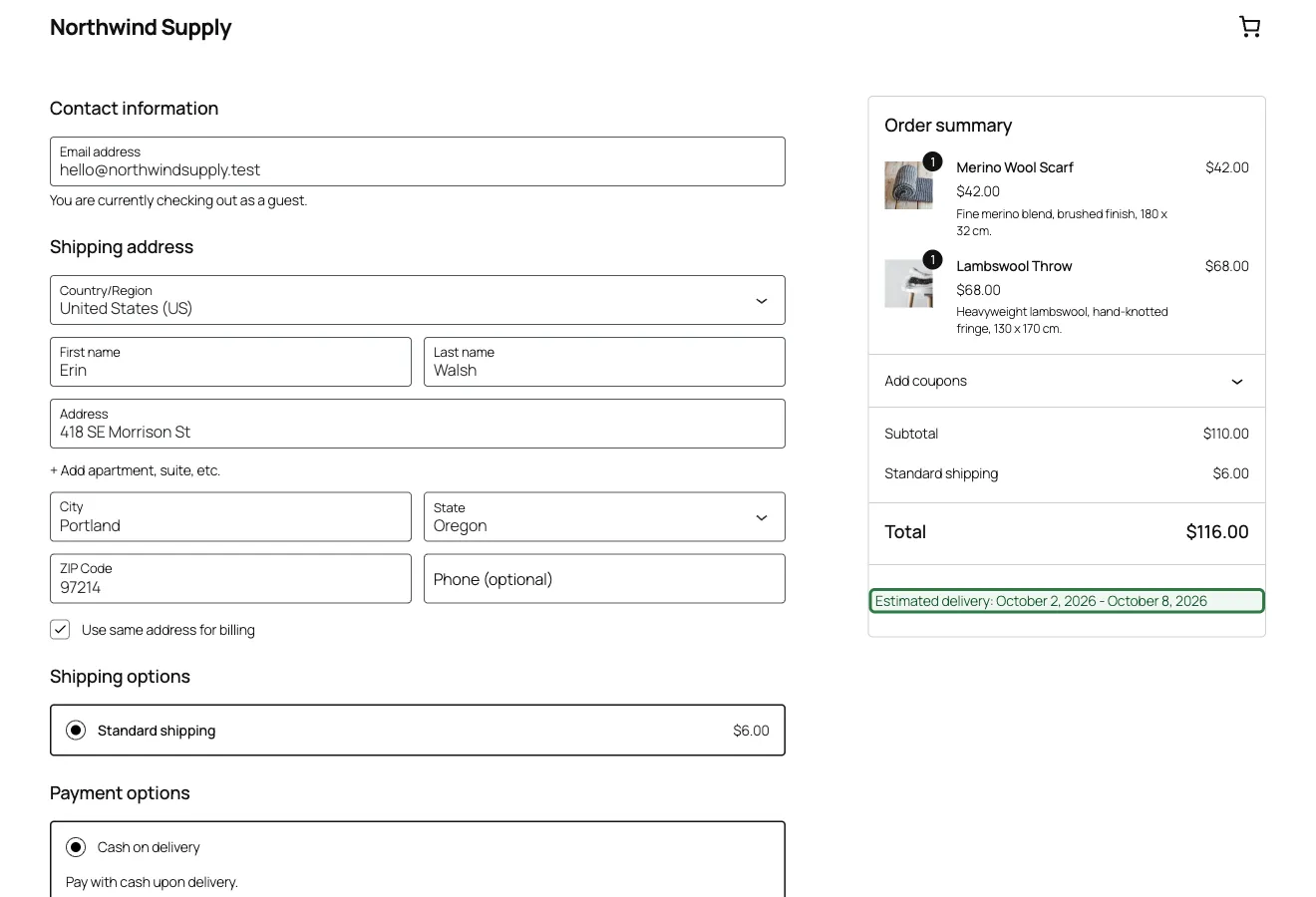
Checkout block support
The estimate appears in the Checkout block's order summary via the Store API — not just the classic checkout.
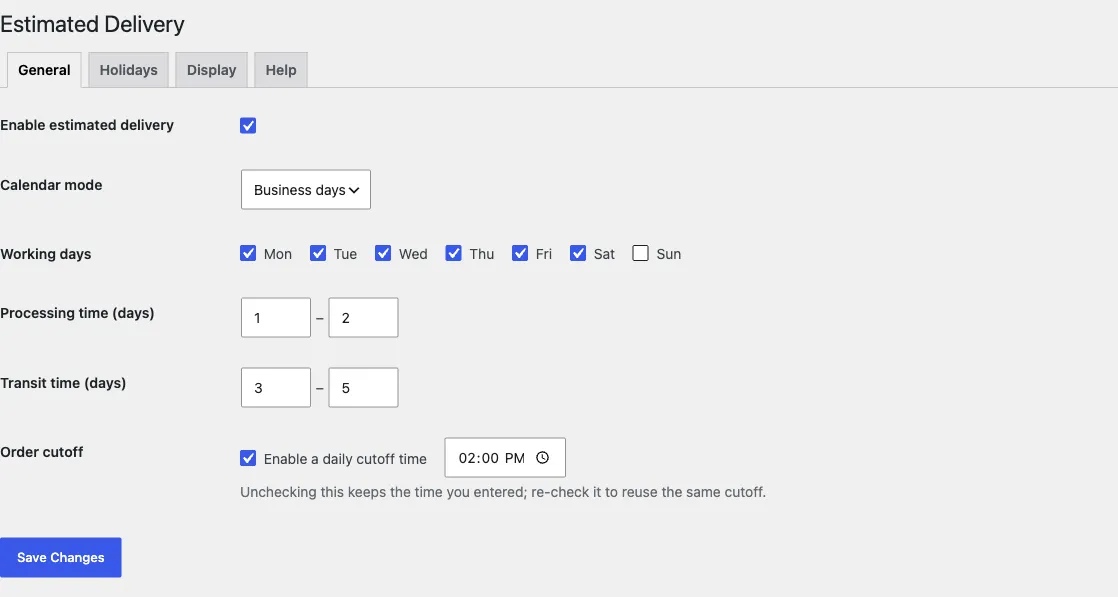
Processing, transit & cutoff
Set processing and transit day ranges, business-day mode, and a daily order cutoff time in one tab.
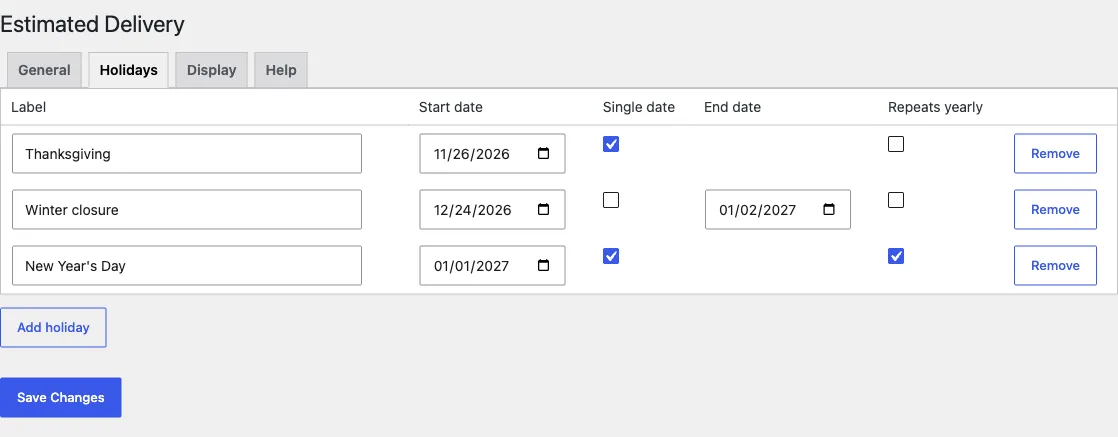
Unlimited holidays
Single dates, date ranges, and yearly-recurring holidays, all in one repeater.
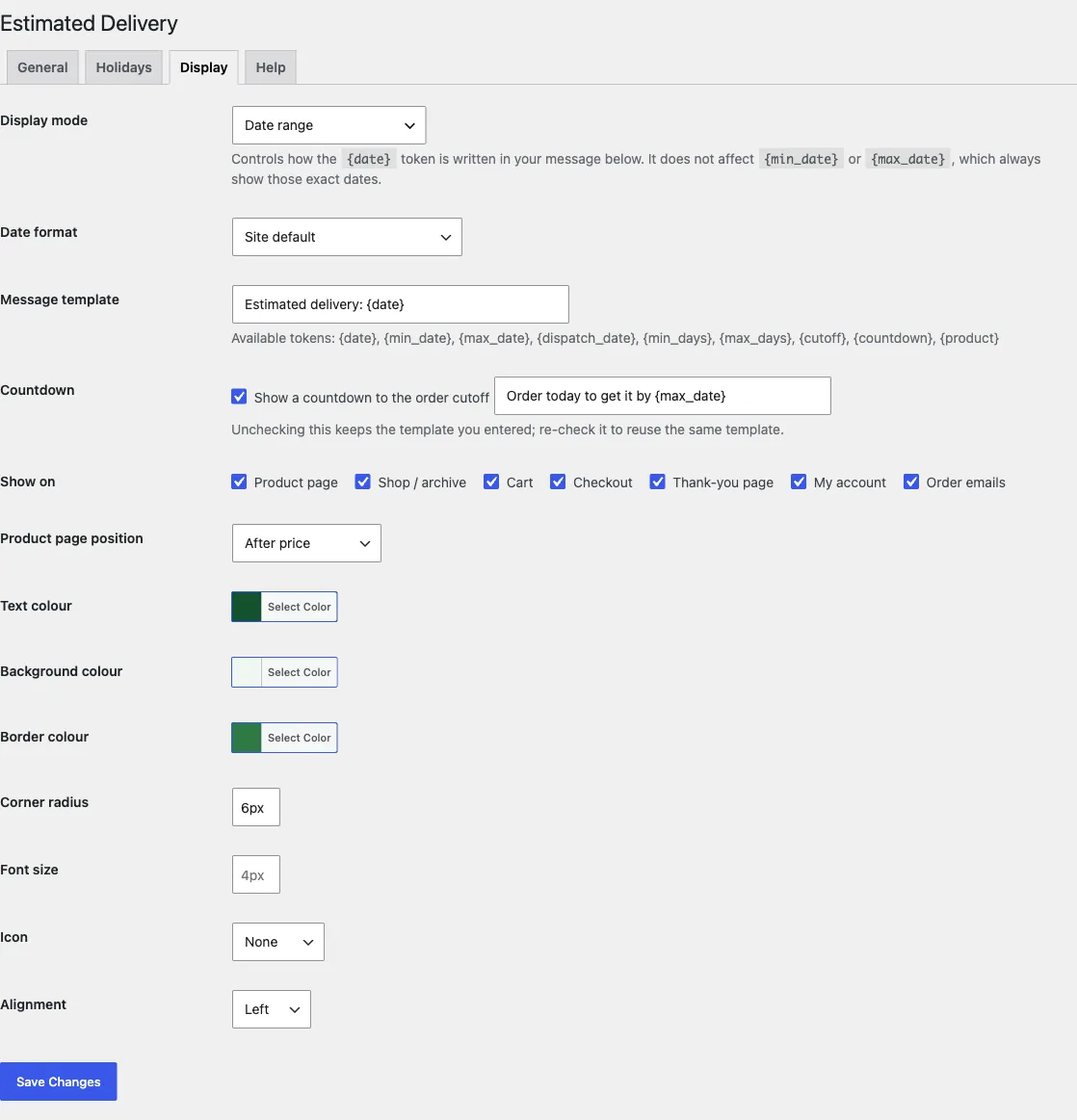
Display modes & styling
Choose a display mode, date format, and message template, then style it to match your storefront.
Processing Time, Transit Time & Business-Day Calculation
Processing & transit time
Set global minimum/maximum processing days and transit days once, and every estimate is built from the same two numbers.
Business-day or calendar-day mode
Count in business days with configurable working days, or in plain calendar days — your choice, store-wide.
Unlimited holidays
Add single dates, date ranges, or yearly-recurring holidays, and they're excluded from every business-day calculation automatically.
Daily order cutoff
Set a daily order cutoff time, with an optional live countdown on the storefront counting down to it.
Per-Product Delivery Date Overrides
Override anything, per product
Customise processing time, transit time, cutoff, or the message for a single product, while the rest of your catalogue keeps using the global settings.
Disable the estimate for one product
Some products shouldn't show a delivery estimate at all — turn it off entirely, per product, without touching your global configuration.
Right in the product editor
Overrides live on their own "Delivery" tab inside the WooCommerce product editor — no separate settings screen to hunt for.
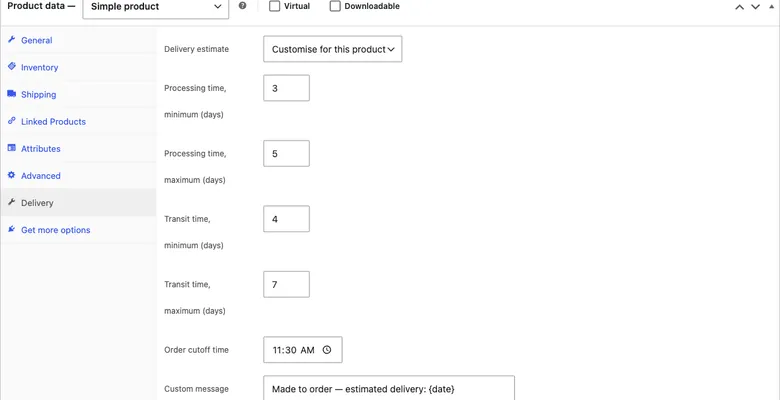
The product editor's own "Delivery" tab, where per-product overrides and the disable-estimate toggle live.
Display Modes, Shortcode & WooCommerce Blocks Support
Six display modes
Date range, exact date, earliest date, latest date, duration, or relative ("in 4 days") — pick whichever reads best for your store.
Formats, templates & basic styling
Configurable date formats and message templates, plus basic styling: colour, border, icon, and alignment.
[devmerx_delivery_estimate] shortcode
Drop the estimate anywhere in a page, post, or template, including [devmerx_delivery_estimate product_id="123"] for a specific product.
Full WooCommerce Blocks support
The Cart and Checkout blocks are fully supported via the Store API, not just the classic shortcode-based cart and checkout.
Displays Everywhere Your Customer Looks
Product page & archives
Show the estimate on the single product page and on shop and category archives, independently toggled.
Cart & checkout
Shown in the cart and at checkout, on both the classic and the WooCommerce Blocks/Store API versions.
Thank-you page & My Account
The estimate follows the order to the thank-you page and into My Account order details.
WooCommerce order emails
The same estimate is included in WooCommerce order emails, so a customer sees it without logging back in.
One engine, every surface agrees
All seven surfaces are independently toggled but read from the same calculation, so none of them can quietly disagree with another.
Immutable per-order snapshots
Once an order is placed, its estimate is snapshotted. Changing settings later never rewrites what a past order already promised.
Full HPOS support
Built for WooCommerce's High-Performance Order Storage from the start, not bolted on afterwards.
Local By Default
100% Local Calculation
Every delivery-date estimate is calculated on your own server. There are no external API calls, no per-request cost, and no customer data leaves your site to compute a date.
Freemius licensing is bootstrapped for the Pro add-on but is inert on this free plugin — no connection and no data leaves your site unless Freemius credentials are configured, which does not happen in a standard WordPress.org install.
Developers can build on top of it with the public dde_get_delivery_estimate() function, plus hooks, without waiting on a REST call to finish.
Compatibility
Requirements & Compatibility
- Requires WordPress 6.0+, tested up to 7.1
- Requires PHP 8.0+
- Requires WooCommerce (hard dependency), WC 8.0+, tested up to 11.1
- Translation-ready
- Full HPOS (High-Performance Order Storage) support
Common Questions
Before you ask.
Does this cost anything?
No. DevMerx Delivery Date Estimator is free, GPL-2.0-or-later, with no price for the free plugin, ever.
Where can I get it?
It's live and free on WordPress.org. Search for "DevMerx Delivery Date Estimator" from your dashboard's Plugins → Add New screen, or install it directly from the WordPress.org plugin directory.
Does it work with WooCommerce Blocks (the Cart and Checkout blocks)?
Yes. It has full WooCommerce Blocks support for both the Cart and Checkout blocks, built on the Store API, not just the classic shortcode-based cart and checkout.
Will the estimate on checkout match the one on the product page?
Yes. One calculation engine drives every surface, so the product page, cart, checkout, thank-you page, My Account and order emails always agree. Once an order is placed, that estimate is snapshotted immutably, so a later settings change never rewrites what a past order promised.
Does it require WooCommerce?
Yes, it's a hard dependency (Requires Plugins: woocommerce) and needs WooCommerce 8.0 or newer, tested up to 11.1.
Does it send any data off my site?
No. The delivery-date calculation is 100% local: no external API calls. Freemius licensing is bootstrapped for the Pro add-on but is inert on this free plugin — no connection and no data leaves your site unless Freemius credentials are configured, which doesn't happen in a standard WordPress.org install.
Is there a Pro version?
Yes. Pro adds rules that pile extra processing and/or transit days on top of your global or per-product estimate, targeted by product category, product tag, shipping zone, or stock status — up to 200 rules, and every matching rule's extra days add together for one predictable total. It's managed from a "Rules" tab right on the free plugin's own settings screen (requires the free plugin 0.2.0+), and pricing hasn't been decided yet. Join the Pro waitlist below to be notified.
Does it support HPOS (High-Performance Order Storage)?
Yes, full support.
Install free from WordPress.org.
Search for "DevMerx Delivery Date Estimator" from Plugins → Add New in your WordPress dashboard, or install it directly — free, GPL-2.0, no price for the free plugin, ever.
Questions? Check the FAQ or get support.
Read the changelog: every release, newest first.