
StockCue: Smart Shopify Inventory Forecasting & Demand Planning
StockCue forecasts demand from your own sales history, tells you how much to buy and when to place the order, then turns that into supplier-grouped purchase orders, receiving, stock counts, and inventory reports. All inside Shopify admin. No ERP implementation, no POS Pro, no spreadsheet holding your reorder logic.
Free for your first 50 SKUs · No credit card · Works on any Shopify plan
- Live on the Shopify App Store
- Forecasting on every plan, including Free
- From $19/mo
Coming from Stocky? Your suppliers and open POs import in one step →
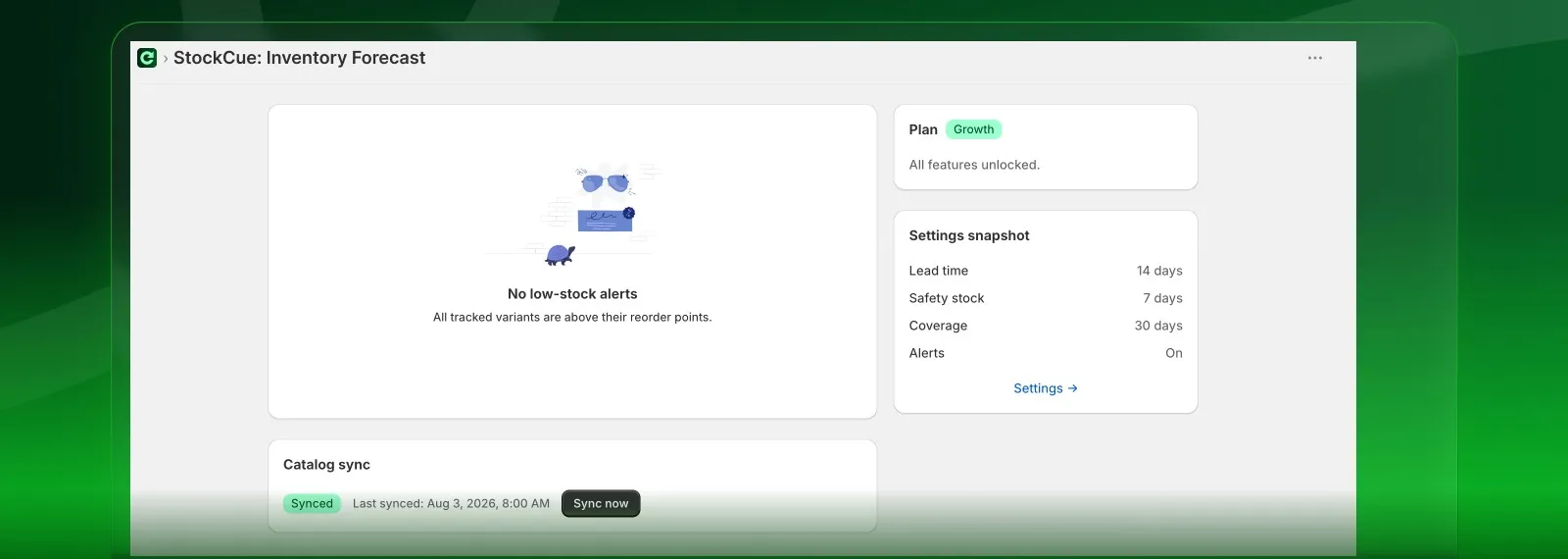
Shopify tells you what you have. Not what to buy.
How long merchants report purchase orders taking on Shopify's built-in tooling.
What the inventory ERPs above Shopify typically cost.
The day Stocky, the free option merchants leaned on, stopped working.
Shopify is a good system of record. It knows a variant is at a location and how many are there. What it doesn't do is tell you that this SKU sells 4.2 a day, your supplier takes 14 days, you have 31 units left, and you needed to place that order on Tuesday.
So that logic ends up in a spreadsheet: recalculated by hand, out of date the moment orders come in, and holding the one number your cash flow depends on. The tier above is an ERP: implementation project, annual contract, $350/month climbing past $1,000. On Shopify's own community forums, merchants working around the gap report purchase orders taking more than triple the time.
StockCue is the tier in between. Forecasting, reorder points, supplier-grouped purchasing, POs, receiving, counts, and inventory reporting, from $19/month, on any Shopify plan, with no implementation project.
From install to first purchase order in an afternoon.
Connect your catalog
Install from the App Store and StockCue syncs your products, variants, inventory levels, locations, and order history straight from Shopify. Nothing to rebuild by hand. Add your suppliers with their lead times, costs, MOQs and case packs, by CSV or one at a time. Moving from Stocky? The importer brings suppliers, product-to-supplier assignments, lead times and open POs across in one step.
Let it learn your demand
StockCue backfills 24 months of order history and recalculates every night: sales velocity blended across a recent and a baseline window, outlier sales excluded, trend sensitivity applied, and seasonal indices derived from your own 12+ months of data. Every variant gets a reorder point and a days-of-cover number.
Work the buying planner
Instead of a flat list of low-stock SKUs, StockCue groups everything you need to buy by supplier, sorted by urgency, with MOQ and case-pack rounding already applied and minimum-order-value warnings surfaced. Tick the lines you want and it drafts the POs.
Send, receive, count
Email the PO to your supplier as a PDF in two clicks. Receive full or partial shipments (scan barcodes if you want), and StockCue writes the inventory back to Shopify and allocates landed cost across the lines. Cycle-count with blind mode and review variance in dollars before you apply it.
Every stockout and every dead SKU is the same missing number.
Inventory mismanagement costs you twice: once in the sales you cannot fulfil, and again in the cash sitting on a shelf. Here is what changes.
Stockouts you find out about from a customer
A best-seller runs dry mid-week. You lose the sale, the customer buys it elsewhere, and the variant slides down your own collection sort while it sits at zero.
A reorder point that moves with demand
Velocity, supplier lead time and safety stock set the trigger per variant, and StockCue tells you seven days before you cross it, not after.
Cash tied up in stock that will not move
Over-ordering a slow SKU parks your working capital on a shelf and keeps paying storage on it. The overstock is invisible until you count.
Buy quantities sized to actual demand
Suggested quantities are damped by your own seasonal curve and rounded to case packs, and the overstock and dead stock report names what is already sitting still.
A spreadsheet holding your reorder logic
Lead times, buffers and velocity recalculated by hand, stale the moment new orders land, and one bad cell reference away from a wrong order.
The math runs nightly, inside Shopify admin
Orders sync from Shopify, every variant is recalculated overnight, and the buying planner hands you a supplier-grouped list that drafts straight into POs.
Everything replenishment needs. Nothing you have to bolt on.
Every feature below is live in the app today. Nothing here is a roadmap promise.
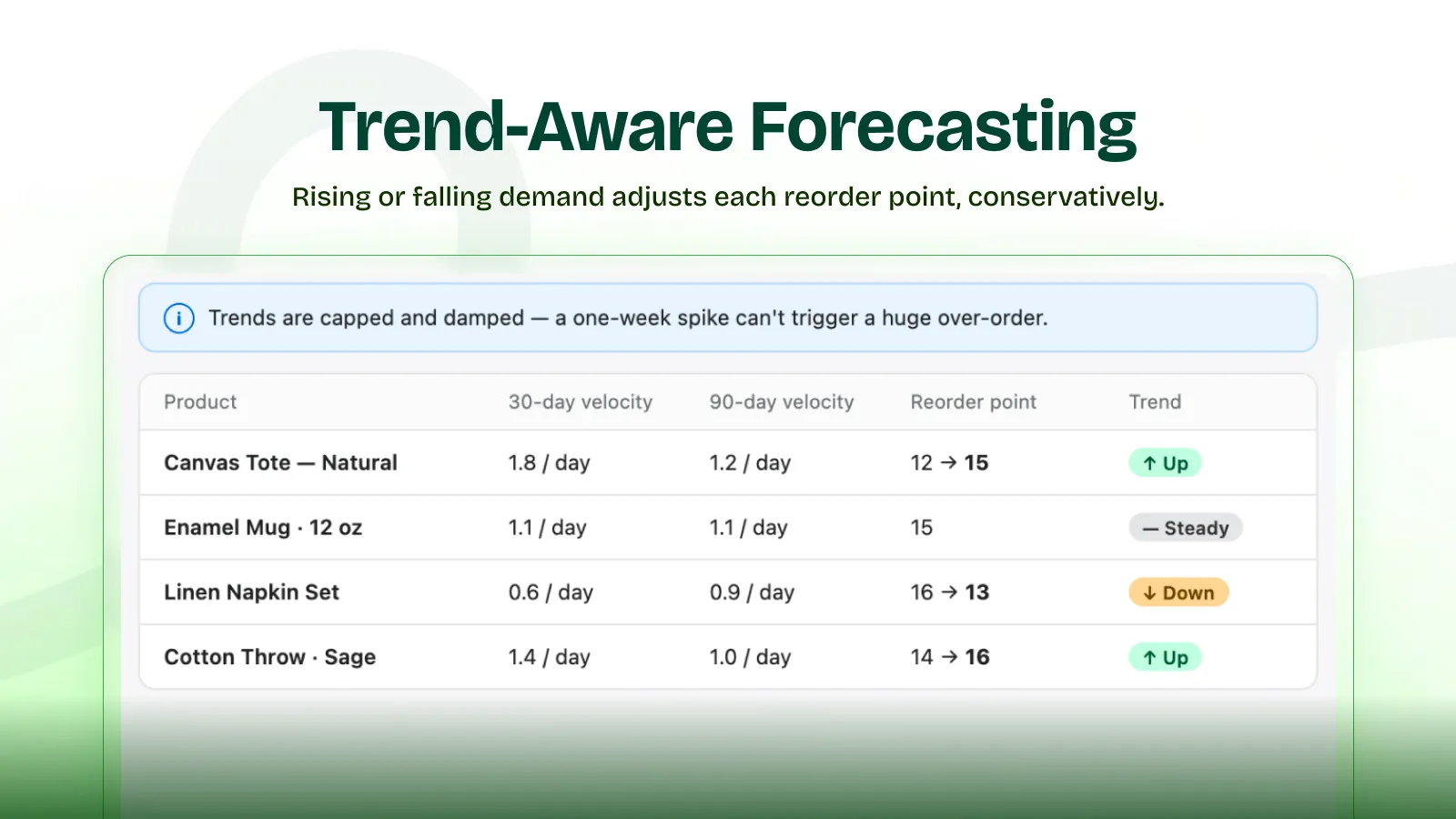
Demand forecasting
Trend-aware reorder points that rise or fall based on actual sales velocity.
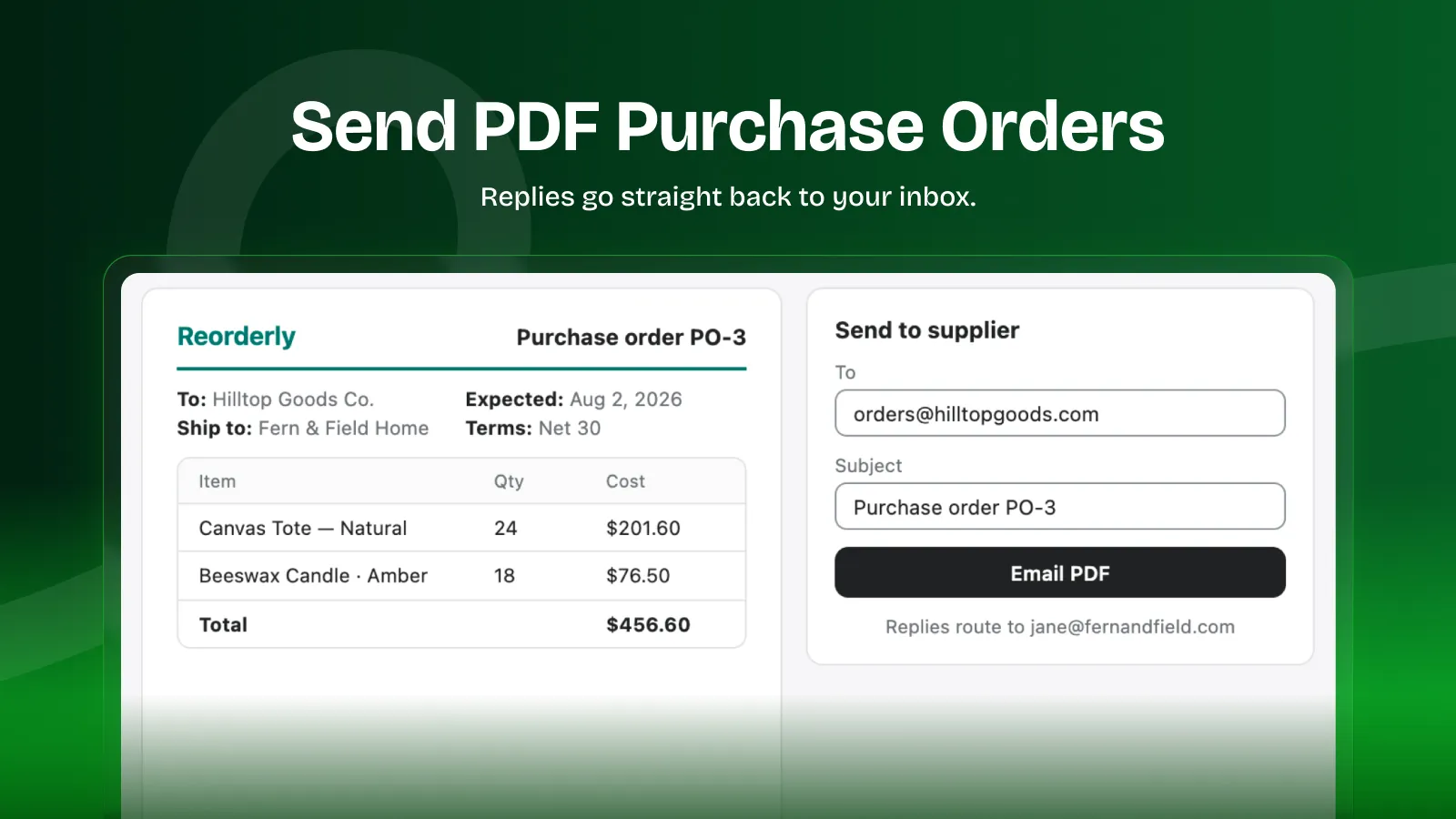
PO PDF + email
Generate, preview, and email purchase orders to suppliers in two clicks.
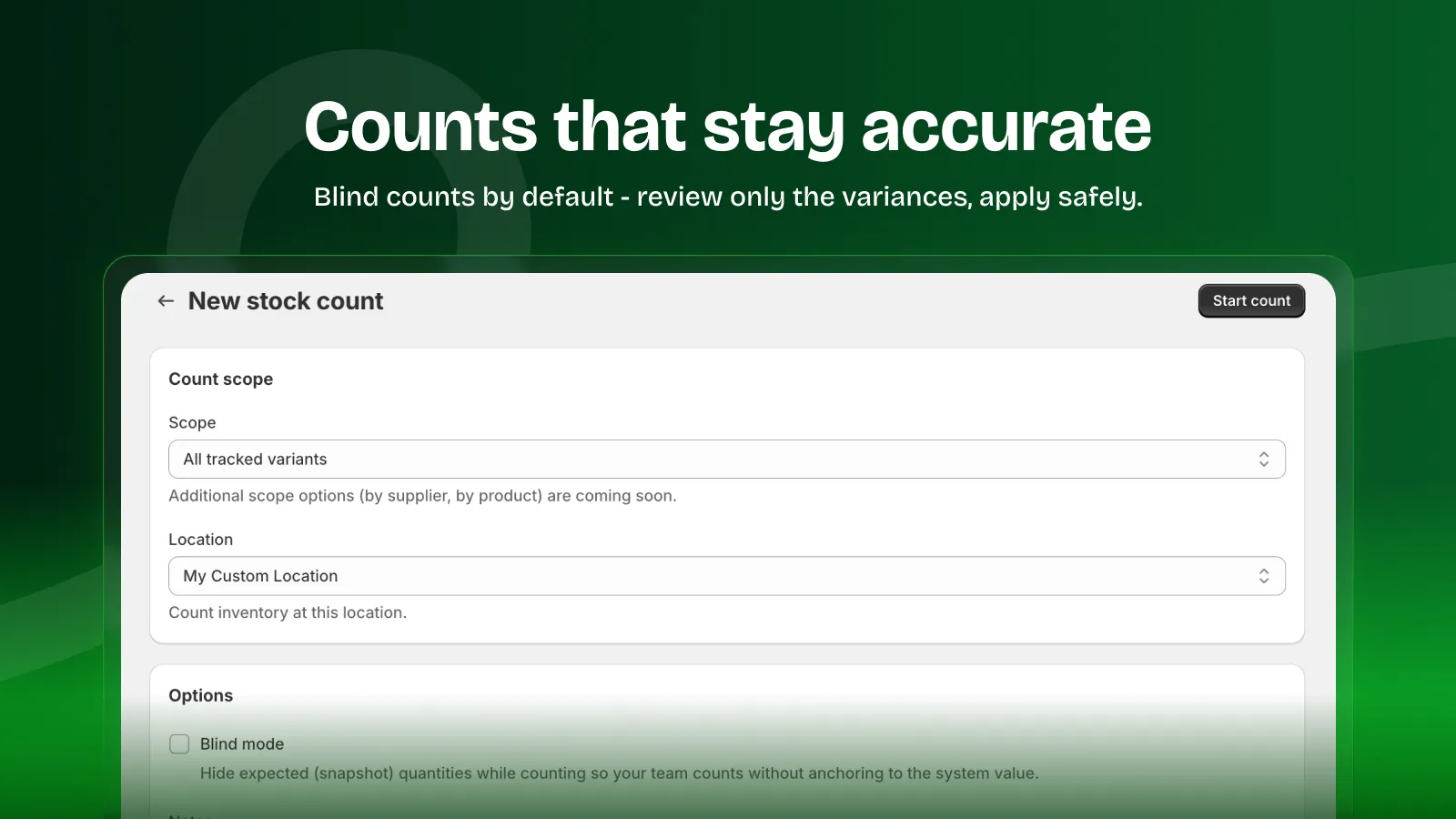
Stock counts
Blind-mode cycle counts with variance review and safe apply.
Automated Demand Forecasting & Sales Velocity
Demand forecasting
Blended velocity across a recent and a baseline sales window, with configurable trend sensitivity and outlier exclusion so one freak order doesn't distort your reorder point. Bundle-aware: bundle sales flow through to component demand.
Seasonal indices
Once you have 12 months of history, StockCue derives your store's own monthly demand curve and applies it to the horizon month you're actually buying for: damped and capped, so a single strong December doesn't triple your January order.
Five alert types, not one
Reorder now · Reorder soon (7 days before you cross the line) · PO late · PO arriving soon · Overstock & dead stock. Subscribe or silence each one independently.
Alerts on your terms
Daily, weekly, or real-time cadence. Quiet hours so nothing lands at 3am. Per-vendor and per-location threshold rules. Multiple recipients. In-app on Free; email from Starter up.
One-Click PDF Purchase Order (PO) Generator
Buying planner
Your reorder list, grouped by supplier and sorted by urgency, with MOQ and case-pack rounding applied and minimum-order-value gaps flagged before you send. Select lines, draft POs in one action.
Purchase orders
Create, edit, and send. Professional PDF, emailed straight to your supplier with your own reply-to address and PO number prefix. Search and filter across every PO you've raised.
Automated PO drafts (Scale)
Put reordering on a schedule: weekly, twice-monthly, or monthly. StockCue drafts the POs; you review and send. Idempotent by period, so a retry never double-orders.
Automated PO send (Scale)
Let a rule send the PO too, not just draft it, per supplier, above a value floor you set. Every automatic send writes an audit row before the email is attempted, so the record exists even on a day your email quota is spent.
Import a supplier's document
Paste or upload a supplier's order confirmation and StockCue reads the lines back into a draft PO (SKU, quantity, unit cost), with per-field confidence so you can see what it was unsure about before accepting.
Dropship purchase orders
Mark a PO as dropship and it never touches your own stock levels. Close it out when the supplier confirms delivery, without a receiving step that would inflate inventory you never held.
Min/max rules and promotion uplift
Set a floor and ceiling per variant. Flag a variant as on promotion between two dates with an expected uplift multiplier, and the buying quantity accounts for it: no waiting on sales history.
Fast Inventory Audits & Barcode Stock Counting
Receiving
Full or partial receipts against a PO, with barcode scan-to-receive from Growth. Inventory syncs back to Shopify idempotently: a double-tap never double-counts.
Landed cost allocation
Spread freight, duty, and handling across received lines with exact largest-remainder apportionment. Your cost basis reflects what the stock actually cost you, not just the invoice line.
Stock counts
Blind-mode cycle counts, location-scoped, with variance review in units and dollars before anything is applied to Shopify. Barcode lookup built in.
Cycle count schedules
Put counting on a recurring cadence instead of remembering to do it. StockCue generates each period's count for you and tracks coverage. Which variants have been counted lately and which have been ignored for months.
Lot and expiry tracking
Record lot numbers and expiry dates as you receive, then work the expiry report to see what is ageing out before it becomes a write-off. Built for food, supplements, cosmetics and anything else with a date on the box.
Bin and sub-location tracking
Shopify tells you a variant is at a location. A bin tells your picker which shelf. Set them per variant, bulk-assign by CSV, and export the lot.
Barcodes and label sheets
Generate real EAN-13 barcodes for variants that have none, then print them to standard Avery label stock. Deterministic per variant, so reprinting a sheet gives you the same codes.
Stock transfers (Scale)
Move inventory between locations with a tracked transfer record, line by line.
Inventory Reports & Analytics
Thirteen reports
Low stock · open purchase orders · stock count variance · inventory value · overstock & dead stock · sell-through · inventory ageing · stockout intervals · product profitability · margin by vendor · margin trend. CSV-exportable from Starter. ABC analysis and margin-weighted ABC on Scale.
Saved and scheduled reports
Save a report with the filters you actually use, re-run it in one click, or put it on a schedule and have it arrive by email. Same bounded datasets as the fixed reports: no query builder to get wrong.
Ask a question
Ask in plain English. "Which vendors have the most cash tied up?": and get an answer drawn from the same report data. Whitelisted datasets only, so it can never invent a number it did not read.
Inventory reconciliation (Growth)
Compare what StockCue holds against live Shopify quantities, variant by variant, and see the drift. Includes the complete list of every circumstance in which this app can write to your stock: generated from the code, not written by hand.
Inventory audit log
Every inventory adjustment in one trail (receipts, applied counts, alert-driven changes), with actor, reason, source, and timestamp. Exportable from Growth.
Supplier reliability (Scale)
Average lead time from PO sent to fully received, per supplier, computed from your own receiving history, so your lead times stop being guesses.
Slack alerts (Scale)
Low-stock alerts into a Slack channel, not just an inbox.
Intelligent Reorder Point & Safety Stock Calculation
You can see exactly why it's telling you to buy 240. Every suggested order quantity opens into a breakdown you can check line by line, not a black box. It's statistical, not AI: blended sales velocity, damped seasonal indices, safety stock, and trend sensitivity, all visible in the buying planner.
- Recent sales velocity × supplier lead time
- + Safety stock
- × Seasonal index for the month you're buying into
- Rounded up to the nearest case pack
= Suggested order quantity: 240 units
Priced by catalogue size. No per-order fees, no per-seat fees, ever.
Start free, upgrade when you're ready to send your first purchase order.
| Feature | Free | Most popular: Starter | Growth | Scale |
|---|---|---|---|---|
| SKU limit | 50 | 500 | 2,000 | Unlimited |
| Demand forecasting + seasonality | Included | Included | Included | Included |
| Bundle-aware forecasting | Included | Included | Included | Included |
| In-app alerts | Included | Included | Included | Included |
| Purchase orders (PDF + email) | Not included | Included | Included | Included |
| Receiving | Not included | Included | Included | Included |
| Stock counts (multi-location) | Not included | Included | Included | Included |
| Buying planner | Not included | Included | Included | Included |
| Stocky import: suppliers & assignments | Included | Included | Included | Included |
| Stocky import: open purchase orders | Not included | Included | Included | Included |
| Manual stock adjustments with reason codes | Not included | Included | Included | Included |
| Cycle count schedules & coverage | Not included | Included | Included | Included |
| Lot & expiry tracking | Not included | Included | Included | Included |
| Bin & sub-location tracking | Not included | Included | Included | Included |
| Barcode generation & label sheets | Not included | Included | Included | Included |
| Saved & scheduled custom reports | Not included | Included | Included | Included |
| Ask a question (AI over your reports) | Not included | Included | Included | Included |
| CSV export of reports | Not included | Included | Included | Included |
| Email alerts / day | Not included | 25 | 100 | 250 |
| Explainable forecasting | Not included | Not included | Included | Included |
| CSV exports: alerts & suppliers | Not included | Not included | Included | Included |
| Scan-to-receive | Not included | Not included | Included | Included |
| Inventory audit log export | Not included | Not included | Included | Included |
| Inventory reconciliation vs Shopify | Not included | Not included | Included | Included |
| Automated PO drafts | Not included | Not included | Not included | Included |
| Automated PO send (with audit trail) | Not included | Not included | Not included | Included |
| ABC analysis | Not included | Not included | Not included | Included |
| Margin-weighted ABC | Not included | Not included | Not included | Included |
| Supplier reliability | Not included | Not included | Not included | Included |
| Stock transfers | Not included | Not included | Not included | Included |
| Slack alerts | Not included | Not included | Not included | Included |
| Order history | 24 months | 24 months | 24 months | 24 months |
Every feature listed above is live in the app today: no roadmap promises. Cancel anytime.
Moving from Stocky?
Stocky was delisted in February 2026 and stopped working on August 31. Everything you relied on has a home here: and the importer does the tedious part for you.
| What you did in Stocky | In StockCue |
|---|---|
| Purchase orders + PDF | ✅ Plus email-to-supplier, PO prefix, reply-to |
| Receiving against a PO | ✅ Plus partial receipts, barcode scan, landed cost |
| Stock counts | ✅ Plus blind mode, dollar variance, location scoping |
| Reorder suggestions | ✅ Plus seasonality, trend sensitivity, outlier exclusion |
| Supplier records + lead times | ✅ Plus reliability metrics from your own PO history |
| Demand forecast | ✅ Plus a "why this quantity?" breakdown |
| Required POS Pro | ❌ Not required. Any Shopify plan. |
| — | ➕ Buying planner grouped by supplier |
| — | ➕ Lot & expiry tracking, bins, barcode label sheets |
| — | ➕ Thirteen reports, plus ABC and margin-weighted ABC |
| — | ➕ Inventory audit trail and Shopify reconciliation |
| — | ➕ Automated PO drafts and sending on a schedule |
| — | ➕ Stock transfers between locations |
Upload your Stocky export under Settings → Import Stocky Data. StockCue auto-detects Stocky's own column names, previews every row before it writes anything, and matches your catalog by SKU with a product-title fallback, so suppliers, product-to-supplier assignments, per-supplier lead times and open POs come across without manual re-entry, with duplicate-supplier detection. Unmatched rows are skipped and logged with their row numbers; fix them and re-run, and the importer updates rather than duplicates.
No export file? Import suppliers from CSV instead (free on every plan), and StockCue rebuilds your forecast from 24 months of Shopify order history on its own. Suppliers and assignments import free; only open purchase orders need Starter.
Before you ask.
How does StockCue calculate demand forecasts?
Can StockCue replace manual Excel spreadsheets?
How does StockCue handle vendor lead times?
Is StockCue easy to set up on my Shopify store?
Which plans get demand forecasting?
What counts as a SKU?
How is this different from NetSuite or a full ERP?
How are the paid plans priced?
Can I pay annually?
Does StockCue write to my Shopify inventory?
Do you support multiple locations?
Can StockCue track expiry dates and lot numbers?
Do I need Shopify POS Pro?
Stocky already shut down. Is it too late to migrate?
What happens to my data if I cancel?
Is StockCue live?
Your next purchase order doesn't have to start in a spreadsheet.
Install free, add your suppliers, and see your first reorder list tonight. Your first 50 SKUs are on us.
Any Shopify plan · No POS Pro · Cancel anytime
Questions? Check the FAQ or get support.
See what's shipped: every release, newest first.
Free for your first 50 SKUs. No credit card.
Install free